
AI Moments
AI Moments translate real-world signals — weather conditions, viral cultural moments, live events — into precise marketing triggers. Define a moment in conversation, and Simon AI fires campaigns when the world matches what you described.
How AI Moments work
You build AI Moments through Simon AI Chat. Describe the trigger you want in plain language and the agent generates the underlying logic, validates it against your data, and deploys it.
A deployed Moment runs continuously: the system evaluates conditions on a refresh cadence (up to every hour) and emits qualifying events into your campaign infrastructure. Each event includes the matched contacts so journeys, segments, and flows can act on the trigger.
Built through conversationAI Moments are configured by describing them. There's no separate Moment Builder UI to learn — Simon AI Chat handles the configuration based on what you tell it. See Triggering Campaigns on Real-World Moments for the agent that builds Moments.
Moment types
Simon AI supports three AI Moment types today.
Weather Moments
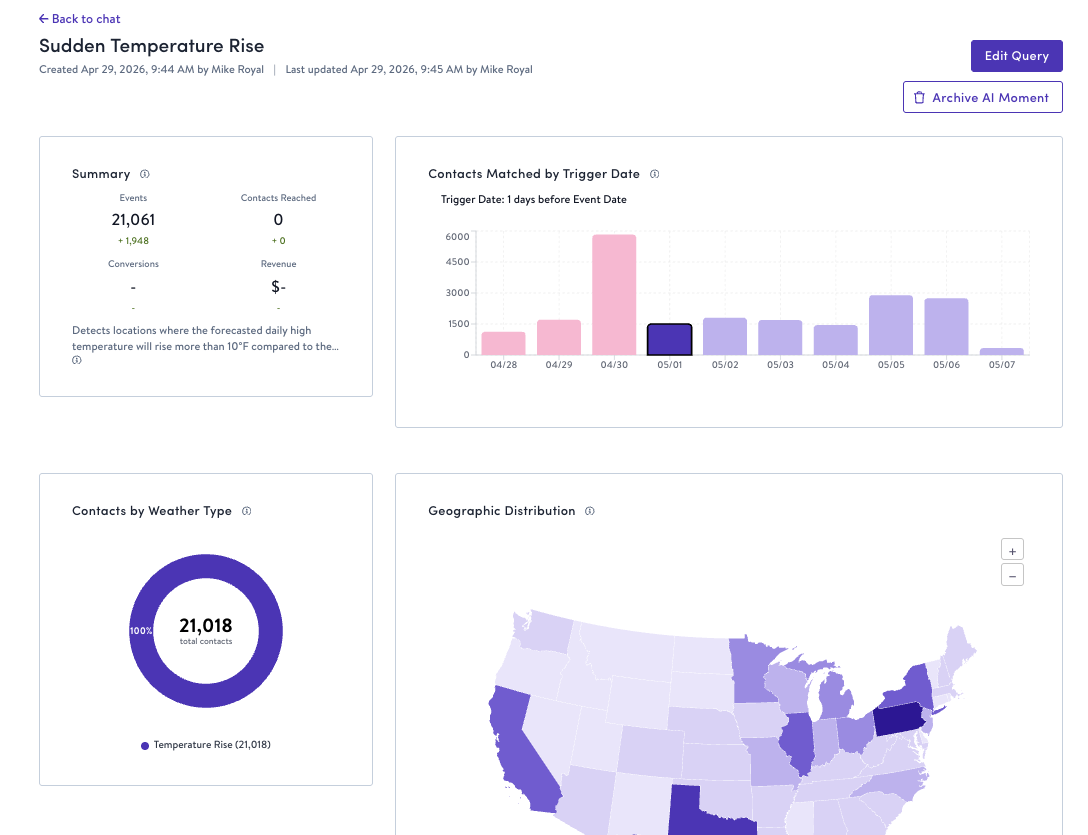
Real-time forecasts and conditions mapped to customer locations. Trigger campaigns based on temperature swings, precipitation, severe weather events, and seasonal shifts.
Example uses:
- Promote weather-appropriate products (cold-weather gear when temperatures drop, cooling items during heat waves)
- Adjust messaging based on local conditions (indoor activity recommendations on rainy days)
- Align inventory and promotions with regional weather patterns
Example prompts:
- "Trigger a campaign when temperatures drop more than 15 degrees in a customer's local market"
- "Fire when precipitation is forecasted in metros where I have outdoor inventory in stock"
- "Send when conditions stay above 85°F for two consecutive days in markets with physical stores"
Weather Moments deploy immediately once activated. The system continuously evaluates conditions against your thresholds and generates qualifying events automatically — no manual approval needed per event.
Social Trend Moments
Viral topics and cultural conversations from social platforms, indexed by velocity and category relevance. Capture cultural moments as they happen and connect them to your brand.
Example uses:
- React to trending topics that align with your product catalog
- Capitalize on viral content and cultural conversations
- Time promotions to ride the wave of organic social momentum
Example prompts:
- "Trigger when a social trend relevant to my brand category gains velocity"
- "Track when product categories I sell start trending on TikTok"
- "Fire when a viral aesthetic I carry in my catalog spikes in social conversation"
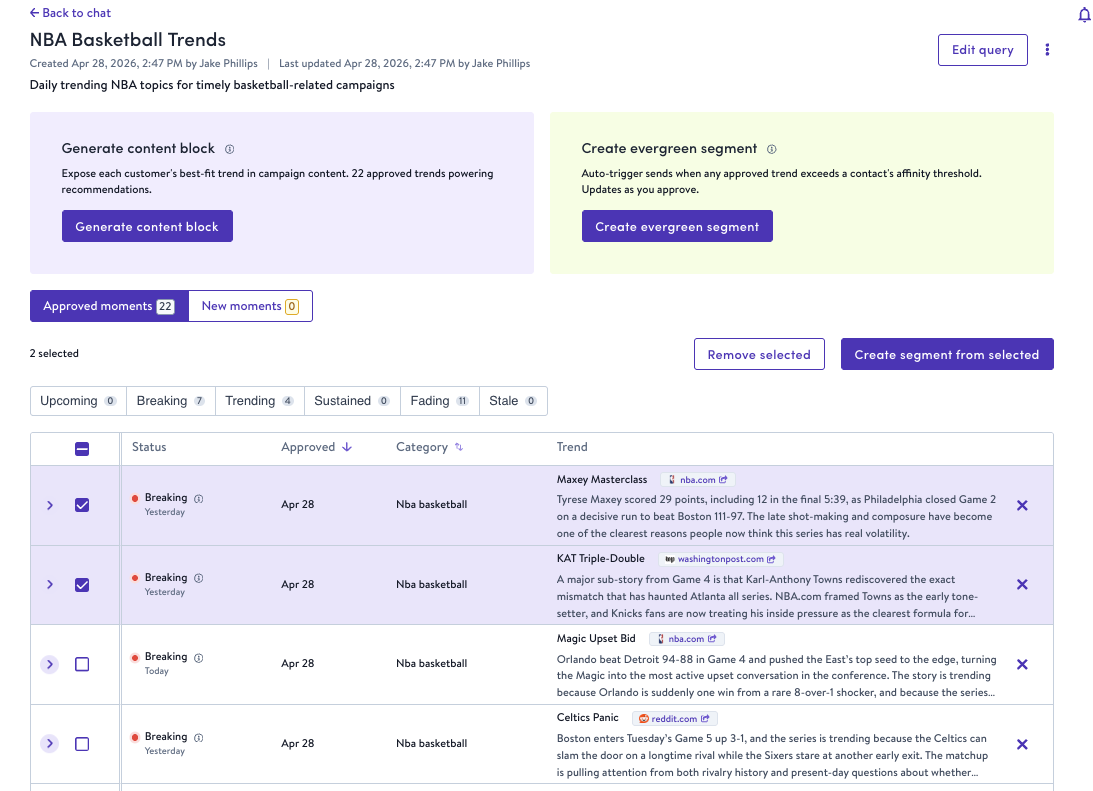
Social Trend Moments include a trend approval workflow. When the system detects trends matching your criteria, they appear in the Moment's detail page where you approve or reject each trend before it triggers campaigns. This gives you editorial control over which cultural signals reach your customers, while still benefiting from automated detection.
Simon scans for new trends multiple times a day, so the review queue stays current with what's moving right now — not what was trending yesterday.
Social Trends Approval Page
Live Event Moments
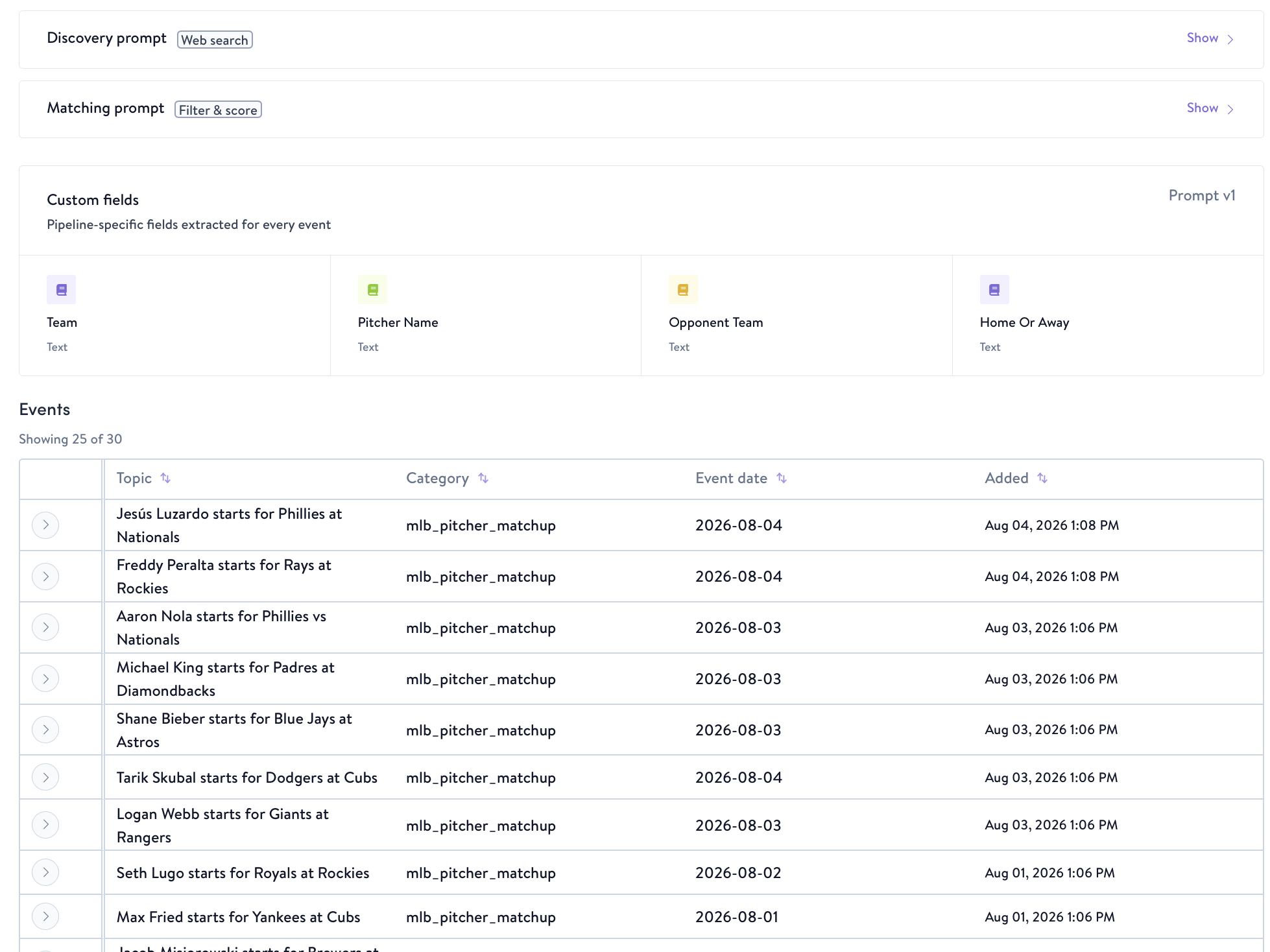
Define the real-world events your brand cares about — league playoffs, local race calendars, industry disruptions, cultural happenings — and Simon monitors them on a recurring basis. A dedicated pipeline discovers events through automated web search, delivers structured event data into your moments pipeline, and keeps it updated on your schedule.
Example uses:
- Trigger campaigns around sports milestones (playoff clinches, rivalry matchups, championship games) in the markets where your customers live
- Promote location-relevant products ahead of local happenings (marathons, festivals, food events, concerts)
- React to industry disruptions (supply chain events, regulatory changes, competitor moves) with timely messaging
- Align campaigns with cultural calendars (awards seasons, heritage months, seasonal traditions)
Example prompts:
- "Track NBA playoff clinch scenarios for teams in markets where I have stores"
- "Monitor upcoming marathons and running events within 50 miles of my customer base"
- "Alert me to highway closures or major infrastructure disruptions near my distribution centers"
- "Find local food festivals and outdoor events in my top 20 markets over the next 30 days"
How it works:
- Describe the events you want to track in Simon AI Chat. The agent asks clarifying questions about scope, geography, and audience relevance
- Simon builds a discovery pipeline — an always-on feed that uses AI-powered web search to find matching events automatically
- You set a refresh schedule (hourly, daily, or custom) so the feed stays current without manual effort
- Discovered events are structured with dates, locations, descriptions, and relevance scores, then delivered into your moments pipeline
- Matching customers are identified based on proximity or other criteria you define, so you can activate campaigns, refine audiences, or personalize content with live event data
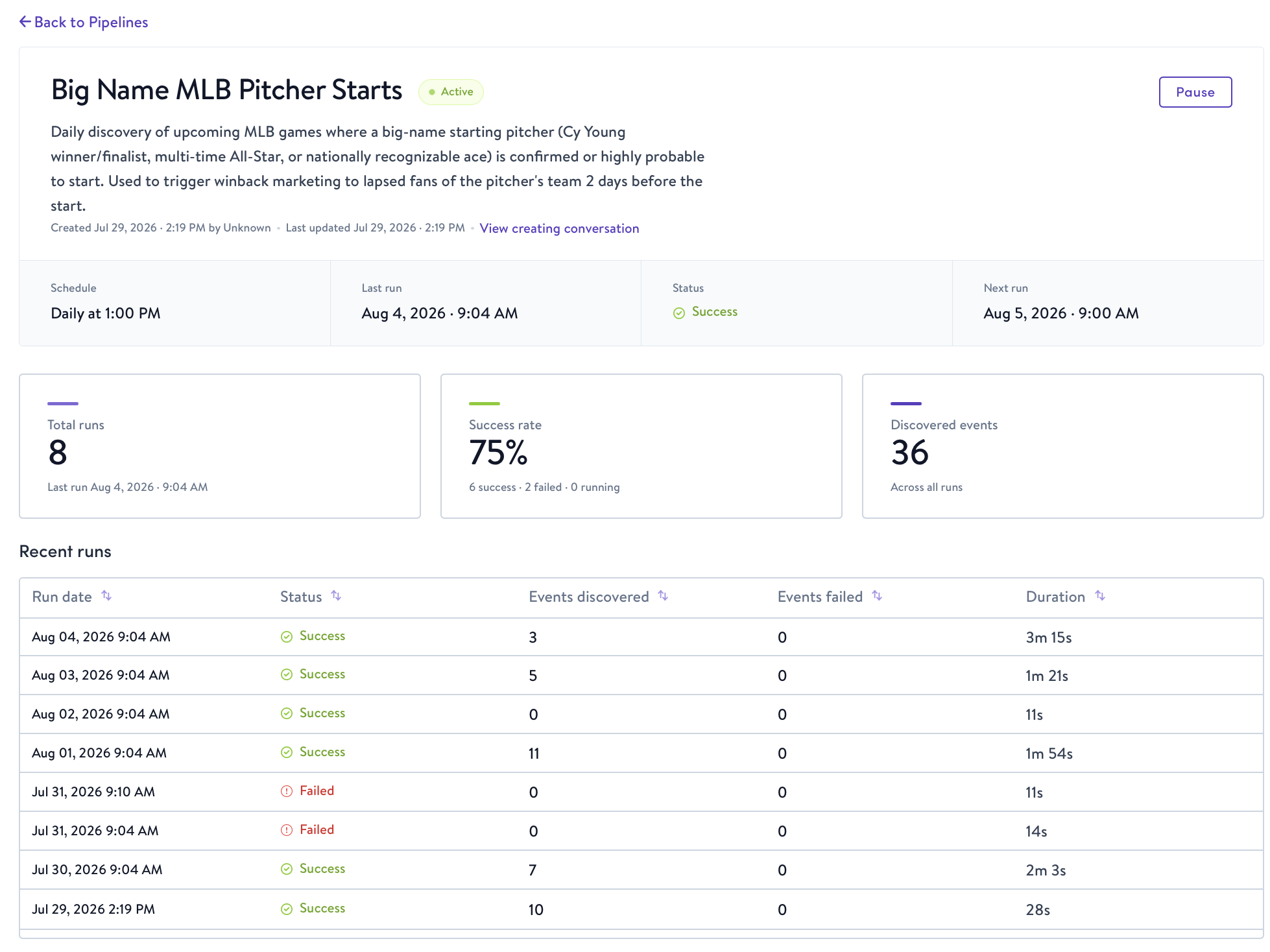
You can monitor every discovery pipeline from the Pipelines tab on the Moments page. Each pipeline shows its status, last run, schedule, and run history, and clicking a pipeline opens its full details.
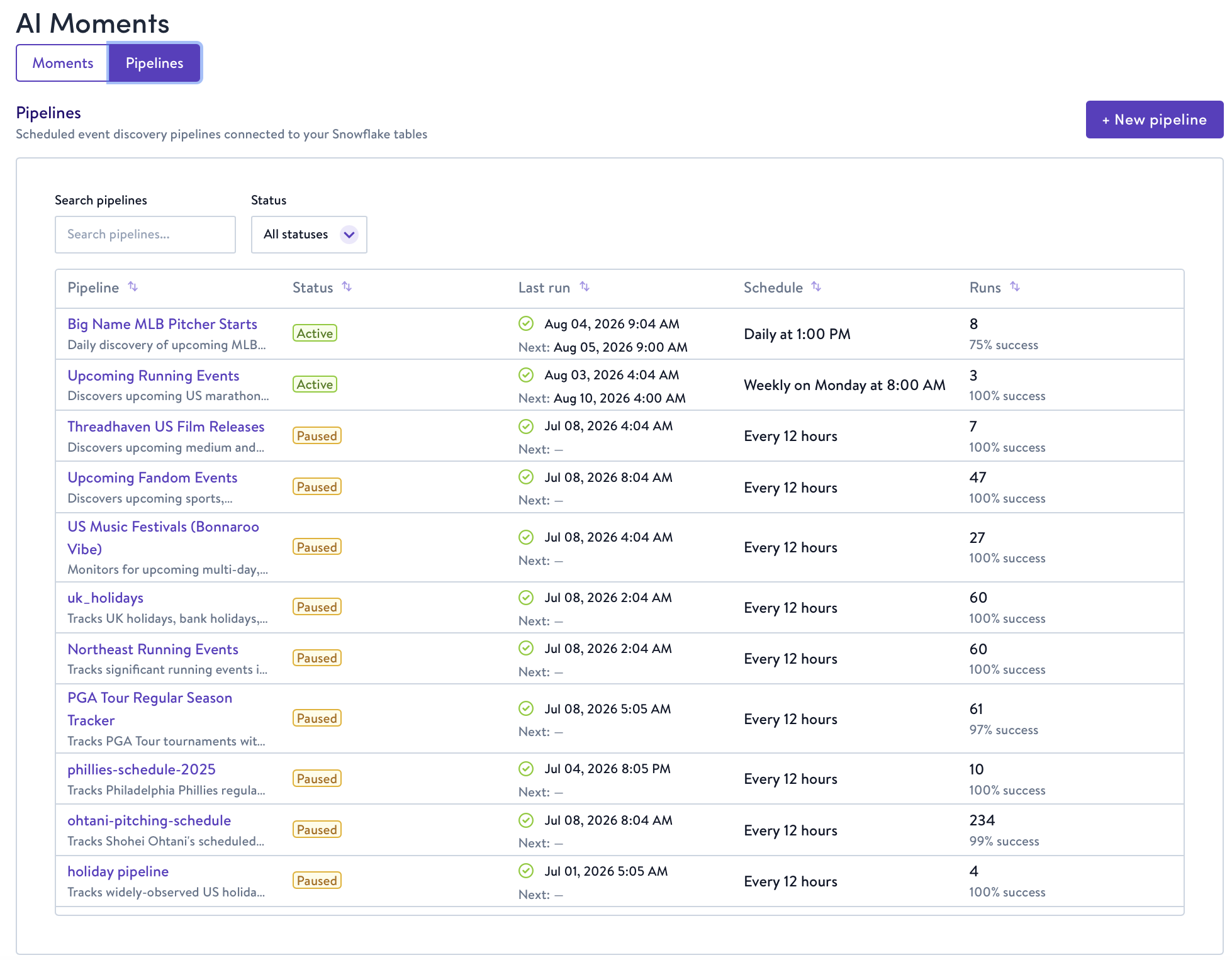
Any event, any signalLive Event Moments go beyond weather and social trends. Sports seasons, local happenings, industry incidents, cultural calendars — if it's happening in the world, it can power your marketing. No engineering effort or manual monitoring required.
Configuring a Moment
When you describe a Moment in chat, Simon AI walks through the configuration with you:
- Define the signal — Describe what should trigger the Moment in plain language. The agent asks clarifying questions about scope, thresholds, and exclusions
- Review the proposal — The agent presents the generated logic, sample preview, estimated impact (events per day or week, qualifying contacts), and a plain-English summary
- Refine — Adjust thresholds, add exclusions, change geographic scope, or layer additional filters by continuing the conversation
- Deploy — Confirm the configuration and choose a refresh cadence (up to every hour). The Moment activates immediately
Monitoring a Moment
Each deployed Moment has a detail page with full visibility into how it's performing:
| Section | What it shows |
|---|---|
| Moment event volume | Incoming event frequency over time. Validates that the Moment captures genuine opportunities, not noise |
| Contacts matched | Addressable audience size for each event. Confirms scale to justify campaign automation |
| Connected assets | Templates, segments, and flows wired to this Moment, with performance metrics |
| Moment event feed | Direct access to raw event data so you can catch data quality issues early |
| SQL and description | Complete transparency into the underlying Moment logic |
| Attribution | Once a Moment-triggered Journey is live, orders and revenue attributed to the Moment |
For Social Trend Moments, the detail page also includes a Trends Review table where you approve or reject individual trends. Approval status, contact counts, and trend metadata are shown for each detected trend.
Launching a Journey from a Moment
Once a Moment is firing, you can wire it into a journey:
- From the Moment's detail page, click Launch Journey. The journey opens in draft with the Entry pre-configured as your Moment feed
- Optionally layer on segment filters (e.g., suppress recent purchasers or limit to contacts above an affinity score threshold)
- Configure the action node with your channel destination and desired action
- Add additional nodes as needed — splits, delays, or further segment and event conditions
- Click Publish to activate the journey
Your Moment now drives automated, timely engagement — from signal detection through audience delivery — with full transparency at every step.
Related
- Simon AI Chat — the interface where you build Moments
- Triggering Campaigns on Real-World Moments — configuring Moments through AI Chat
- Affinity and Propensity Scoring — combine with Moments to reach the contacts most likely to act on a trigger
Availability
Weather Moments and Live Event Moments are available to all AI-enabled organizations as part of the Simon AI core platform. Social Trend Moments are part of the Simon AI Enrichment tier — contact your account manager for activation details.
Updated about 2 months ago