
Projects
Projects are goal-based campaign workspaces in Simon AI. Create a Project around a specific business objective — like "increase 90-day repurchase rate" or "reactivate lapsed apparel buyers" — and everything you build toward that goal lives in one place.
Core AI · Included with your Simon platform.
Getting started
- Navigate to AI > Projects
- Describe your business objective in plain language (e.g., "drive repeat purchases from holiday buyers")
- Add any relevant context — brand guidelines, audience constraints, prior learnings — that should apply across every conversation in this Project
- Start a chat. The AI inherits the Project's goal and context as the starting point for everything you build
What a Project contains
| Component | Description |
|---|---|
| Business goal | The objective you're working toward, described in plain language |
| Project context | Brand guidelines, audience constraints, past learnings — markdown context entries that apply across every conversation in this Project |
| Associated assets | Segments, journeys, flows, AI Moments, and AI-generated datasets created or linked while working on this Project |
| Linked chats | All conversations started from the Project, organized in one place |
What Projects do
- Give the AI shared context. When you chat from within a Project, the AI automatically knows the goal, target audience, constraints, and business context. No re-explaining every session
- Organize campaign assets. Instead of segments, fields, and journeys living in separate places, everything built for one initiative is visible together
- Track linked work. As you create or attach assets, they automatically link back to the Project so you can see what's been built toward your goal at a glance
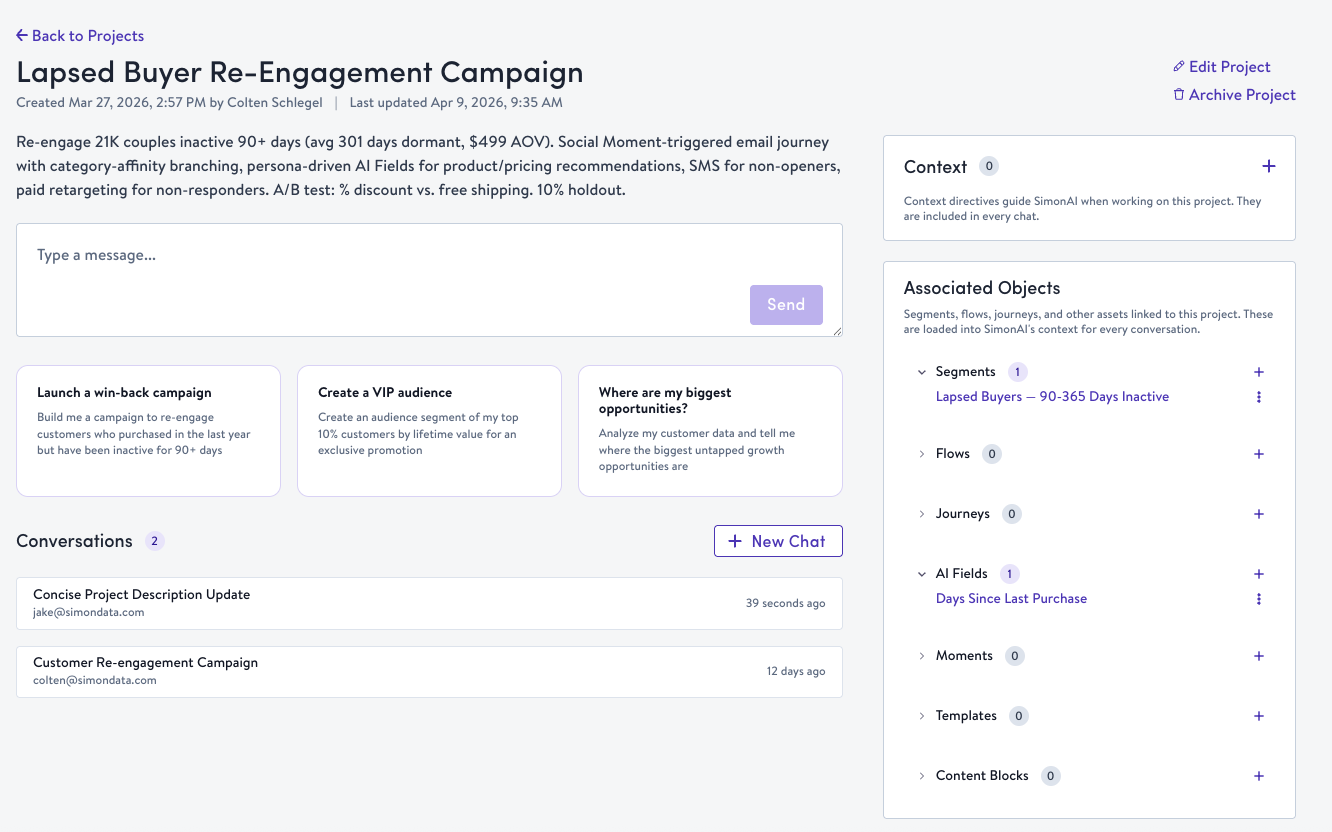
Working inside a Project
Once your Project is created:
- Add context — Brand voice guidelines, seasonal priorities, past campaign learnings. These become AI Context entries scoped to this Project
- Start conversations — Open a chat from within the Project. Simon AI Chat already understands your objective and uses it as context for data analysis, content generation, segment building, and more
- Multiple conversations — Teams can run parallel conversations within a single Project for different workstreams
As you create assets, they automatically link back to the Project. The detail page keeps everything visible in one place.
Chats inside a Project are visible to everyone with access to that Project, while chats started outside a Project stay private to their creator. You can move a chat into a Project to share it with the team, or out of a Project to make it private again — Simon confirms the change first, since it affects who can see the conversation.
Availability
Projects is available to all AI-enabled organizations.
Updated 2 months ago