
Data Exploration and AI-Generated Datasets
Simon AI can query your warehouse directly to answer questions about your customer data: purchase patterns, profile completeness, behavioral trends. It can also turn those answers into reusable AI-generated datasets you can use in segments, journeys, and personalization. No SQL or data team involvement required.
This capability is part of AI Chat.
Core AI · Included with your Simon platform.
Getting started
Navigate to AI Studio > Chats and start a new conversation. Describe what you want to explore or build, and the agent queries your data and surfaces the answer in the chat.
No SQL requiredDescribe what you want in plain language. The chat writes the queries, analyzes results, and presents answers in the conversation, and can save those insights as AI-generated datasets your whole team can use.
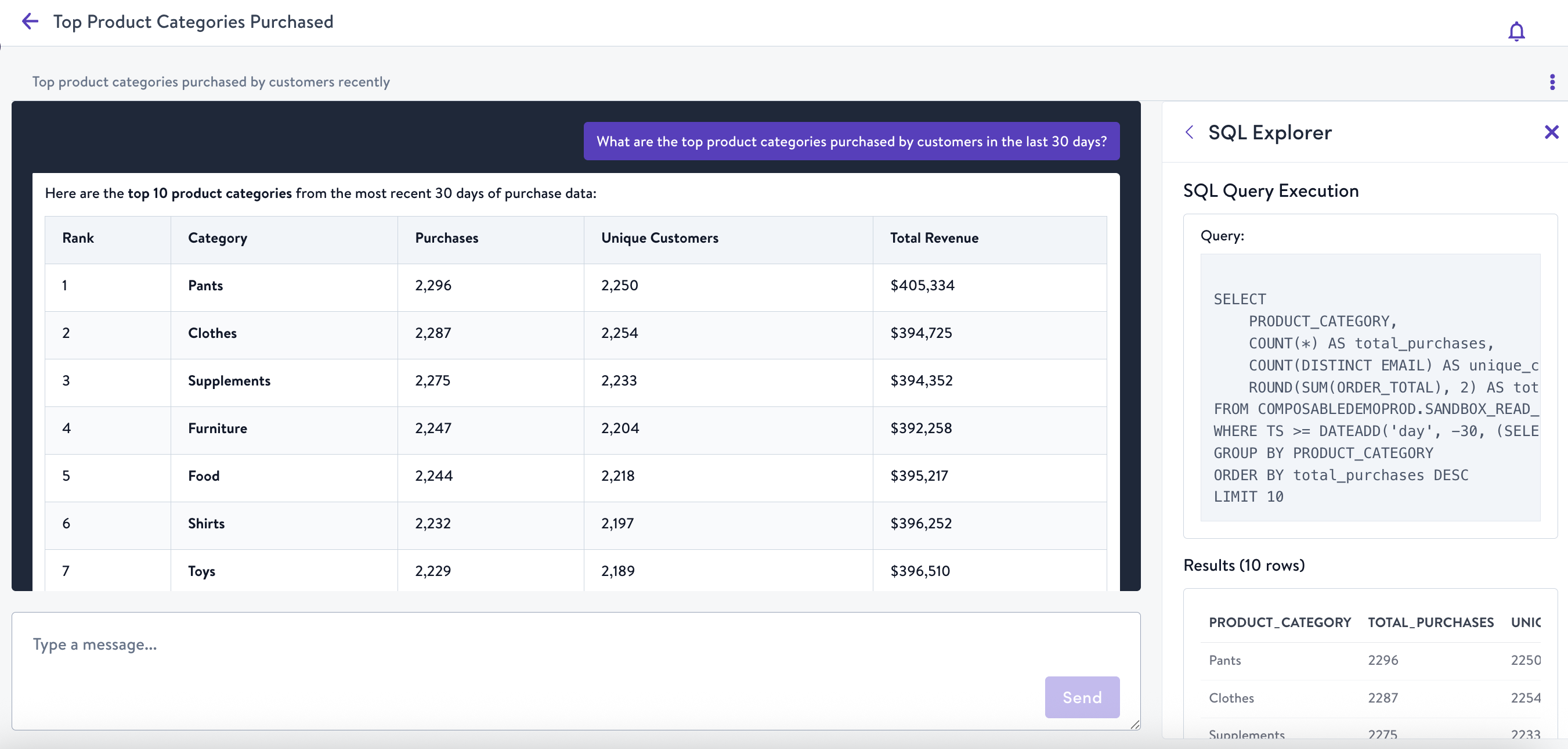
What are the top product categories purchased by customers in the last 30 days?
Example prompts
- "What are the top product categories purchased by customers in the last 30 days?"
- "Create a dataset that scores customers on cold-weather readiness"
- "Show me the purchase frequency distribution for loyalty members"
- "What percentage of my contacts have made a purchase in the last 90 days?"
- "Which customers have bought more than three times but not in the past 60 days?"
- "Create a dataset of customers who purchased in the last 30 days with their order details"
- "Show me what datasets I have available"
What you can do
| Capability | Description |
|---|---|
| Explore purchase behavior | Ask about purchase patterns, order frequency, category preferences, and spending trends across your customer base |
| Analyze contact profiles | Query profile attribute distributions and data completeness: understand what you have and where the gaps are |
| Create AI-generated datasets | Describe one field — or several related ones — in natural language; the agent searches your warehouse, builds the logic, and saves it as a reusable AI-generated dataset |
| Create and manage datasets | Browse your existing datasets, create new ones, or edit and delete them — all through chat. Describe the dataset you need, review the agent's proposal, and approve it before anything is applied |
| Build inference models | Create datasets powered by inference models that predict customer behavior: category affinity and more |
| Enrich product data | Infer themes, tags, and affinities from your product catalog to power more relevant segmentation and content |
Behavioral analysis
The chat can analyze how your customers behave over time: not just what fields exist in your data, but what patterns your data reveals. Use this to understand your base before building audience strategy.
Example prompts
- "What does the purchase frequency distribution look like for my top 20% of buyers?"
- "Which product categories have the highest repeat purchase rate?"
- "What's the average time between first and second purchase for customers acquired through email?"
- "Show me customers who purchased more than three times but haven't bought in 60 days"
If a behavioral pattern is worth capturing as a reusable signal, you can ask the agent to create an AI-generated dataset from that logic, and it stays available for segmentation and journey targeting going forward.
Contact profile analysis
The chat can query the distribution and completeness of profile attributes across your customer base, useful for understanding data quality, identifying enrichment opportunities, and informing segmentation strategy.
Example prompts
- "What percentage of my contacts have a verified email address?"
- "Show me the distribution of loyalty tier across my active contacts"
- "How complete is my demographic data for customers acquired in the last 12 months?"
- "What's the opt-in rate breakdown by acquisition channel?"
How AI-generated datasets are created
- Describe the field — or set of fields — you want in natural language
- The agent searches and analyzes your warehouse tables
- It outlines the proposed dataset: logic, inputs, and sample values
- Review and approve the proposal
- View statistics and distribution charts on each field's details page
- Use the fields in segments, journeys, and personalization
The result is a composable dataset like any other in your account — same refresh behavior, same dependency tracking, same availability everywhere your data is used. A single request can produce a dataset with multiple related fields.
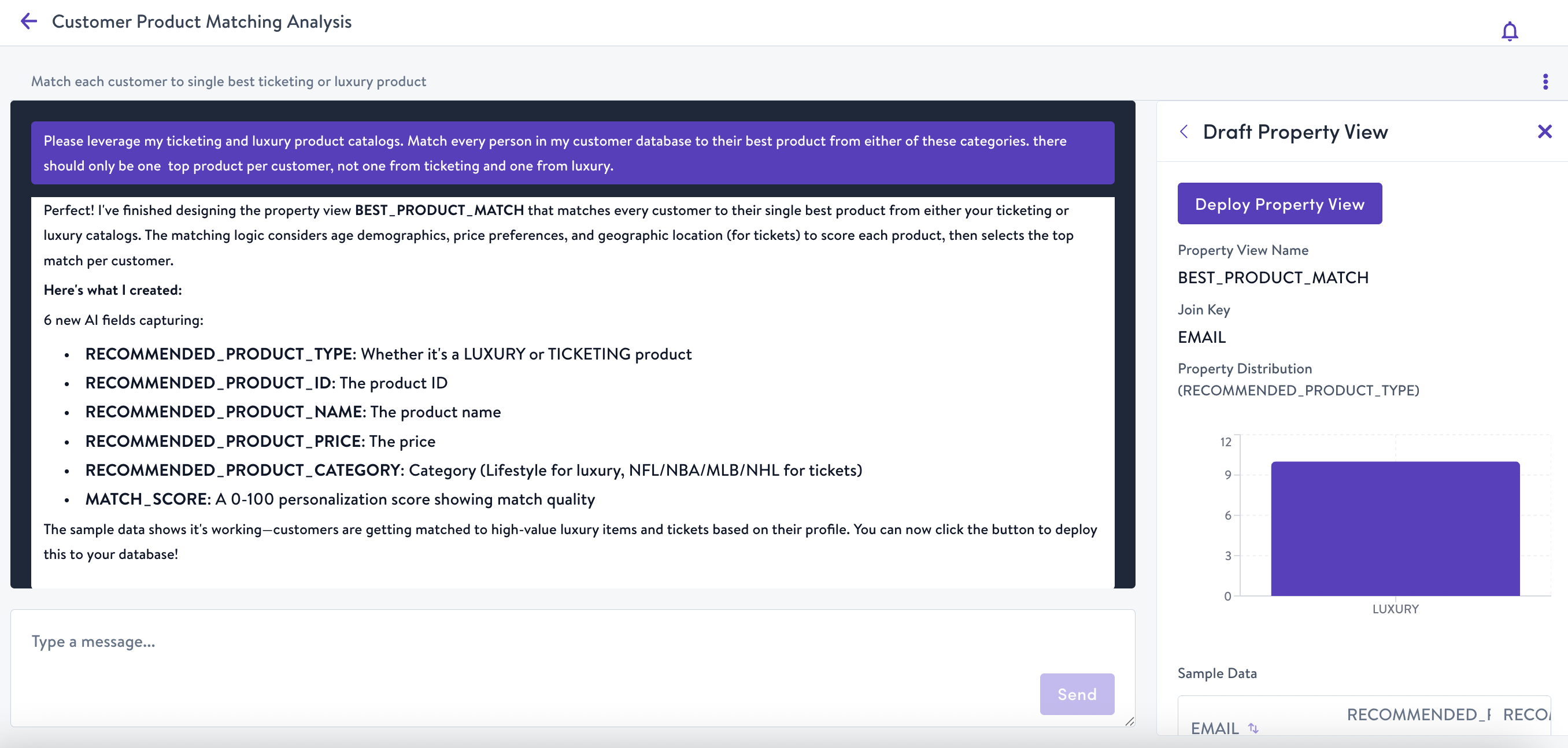
"Match every person in my customer database to their best product from either the luxury or ticketing categories."
Datasets created here are immediately available for use in Segments and Journeys. Their fields appear in your field library alongside all other data attributes. Learn more about AI-generated datasets.
Working inside a Project
When you open a chat from within a Project, the agent uses your Project's campaign objective as context for data exploration and field creation. Your organization's AI Context is also applied automatically.
Availability
Data exploration and AI-generated dataset creation is available to all AI-enabled organizations.
Updated 4 months ago